
ProTool
BimmerGeeks ProTool LLCAuto & Vehicles
4.4325.00 Reviews
- Version
- 2.52.7
- Installs
- 100.00K
- Age Rating
- Everyone
Screenshots
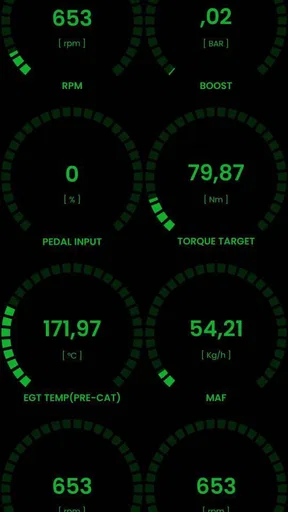
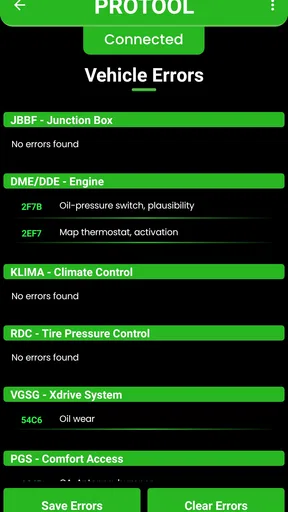
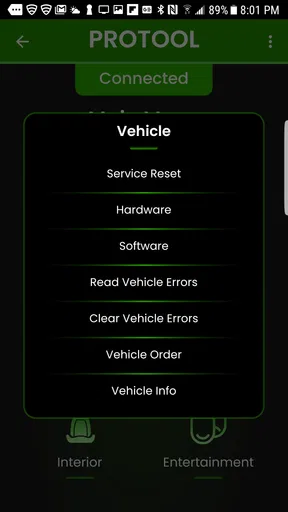
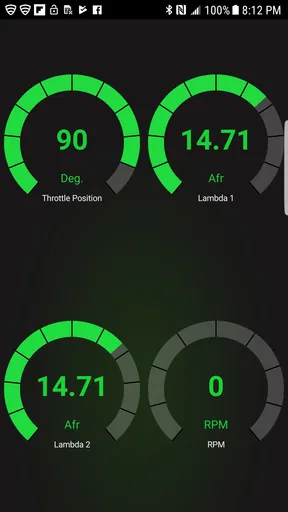
Our Review of ProTool
 Analysis by Appyee
When a BMW starts showing an unfamiliar warning, the frustrating part is often not the repair itself but the gap between noticing the problem and understanding what the car is trying to report. ProTool approaches that gap as a serious diagnostic and coding tool rather than a simple trip computer. After spending time with it, I see the appeal: it is aimed at owners who want to inspect their vehicle more deeply and, where appropriate, change supported settings without immediately handing every question to a workshop.
Developed by BimmerGeeks ProTool LLC, this free Auto & Vehicles app is available for everyone and has built a solid audience, with an average rating of 4.4 from around 1.1K ratings and more than 100K installs. Those figures do not make it a substitute for mechanical knowledge, but they do suggest that it has found a practical place among BMW owners who want more control over diagnosis and configuration.
From a warning light to a useful diagnosis
I’ll start with the moment that makes a BMW owner reach for a diagnostic tool: an unexpected warning and the need to decide what to do next. I find it helps to treat the first scan as a way to gather clues, not a verdict, then carry that information into a more careful check of the vehicle’s symptoms.
Starting with the real problem
The best way to use ProTool is to begin with a specific question. “My car feels wrong” is too broad for any diagnostic app, while “the dashboard warning appeared after a cold start” gives you a sensible starting condition. I would first note what happened, when it happened, and whether the car still drives normally. That small bit of preparation matters because diagnostic codes are clues, not complete repair instructions.
For example, imagine leaving for work and finding a warning that was not there the previous evening. Instead of repeatedly restarting the car or guessing from a generic internet search, I would connect the phone to the vehicle using the compatible setup required by the app, open ProTool, and begin by reading the vehicle’s stored information. The useful outcome at this stage is not simply a long list of codes. It is a clearer separation between an active issue, an old event, and something that deserves immediate attention.
This is where ProTool feels different from ordinary vehicle apps. A basic dashboard companion may show fuel, trips, or maintenance reminders, but it usually does not put BMW-focused diagnostics and coding at the center of the experience. A general OBD reader can be convenient for broad engine information, yet it may not offer the same depth for BMW-specific modules and settings. ProTool is designed for the owner who wants to look beyond the most visible engine data.
Moving through the diagnostic flow
Once connected, I would resist the temptation to clear everything immediately. Reading first and saving or noting the results gives you a reference point. Clearing a warning can make the dashboard look better without fixing the underlying cause, and it can remove useful evidence for a technician. The more responsible workflow is to inspect the reported module, compare the message with the symptoms, and only then decide whether a reset is appropriate.
A practical use case is a car that has recently had a battery replaced. The vehicle may behave normally, yet several systems can retain historical faults or require attention after the electrical change. ProTool can be useful here as an inspection step: I would check what the car reports, distinguish current faults from stored history, and use that information when speaking with a mechanic. The app does not turn a battery replacement into a complete diagnosis, but it can make the handoff more informed.
Another useful scenario is a vehicle bought second-hand. Before changing anything, I would use the diagnostic side to understand what the car is reporting and to create a baseline. That baseline is more valuable than immediately enabling cosmetic preferences because it tells me whether the car already has unresolved electronic issues. If a warning returns after a short drive, I have a clearer record of what changed and when.
The app’s coding capability is most appealing after the diagnostic picture is stable. Coding is not the same as repairing a failed component. It changes how supported vehicle functions are configured, so I would treat every adjustment as a deliberate handoff from information gathering to vehicle modification. Reading the existing configuration, changing one setting at a time, and documenting the original choice is a much safer habit than experimenting with several options in one session.
Why the handoff matters
There are really three handoffs in a ProTool workflow. The first is from the car to the app: the vehicle supplies the information, while the app organizes it into something I can inspect. The second is from the app to me: I must interpret the result instead of treating every code as a final verdict. The third is from me to a professional, when the issue involves mechanical work, safety systems, or information I cannot confidently evaluate.
That last handoff is important for brakes, steering, airbags, restraint systems, and anything that could affect the car’s behavior in traffic. I would not use a successful connection or a cleared message as proof that the vehicle is safe. ProTool can help me communicate more precisely with a workshop, but it cannot replace a physical inspection or a qualified repair decision.
The same caution applies to coding. A setting that looks harmless may behave differently across BMW models, equipment levels, or software configurations. I would confirm that a change is appropriate for the exact vehicle before applying it, keep the car’s power supply stable, and avoid treating a coding session like a casual phone customization. The convenience is real, but so is the responsibility.
What the result looks like in everyday use
Suppose the morning warning turns out to be a stored event rather than a current failure, and the car continues to operate normally. The useful result is not simply “the light disappeared.” The better result is a documented understanding of what the car reported, whether the issue returned, and what information to give the workshop if it does. ProTool earns its place when it improves that chain of decisions.
For a knowledgeable owner, the result can be even more direct. A person who already understands BMW modules and coding may use the app to make a supported configuration change without scheduling a visit for every small preference. In that situation, the app can save time and make ownership more hands-on. I especially like the idea of separating the diagnostic session from the coding session, because it reduces the chance of changing settings before knowing whether the vehicle is already experiencing a problem.
There is also value in using the app as a communication tool. If I arrive at a workshop saying only that “the car has an electrical issue,” the conversation starts with guesswork. If I can explain when the symptom began and what the vehicle reported, the technician has a more useful starting point. That does not guarantee a faster repair, but it makes the handoff less vague and can help avoid replacing parts based only on assumptions.
Small habits that make the app safer and more useful
- Read before clearing: keep a record of the initial condition so a returning fault can be compared with the original one.
- Change one coding option at a time: this makes it easier to identify which adjustment caused an unexpected result.
- Use a baseline after major ownership changes: a recently purchased BMW or a car that has had electrical work benefits from an early diagnostic snapshot.
- Separate electronic clues from physical symptoms: a code can point toward an area of concern, but noises, smells, leaks, and handling changes still need real-world inspection.
- Plan the workshop handoff: bring the observed symptom, the timing, and the diagnostic result instead of relying on memory.
These habits are more important than simply knowing where a button is. The strongest benefit of ProTool comes from using it as part of a repeatable process, not as a magic reset tool. That distinction is easy to miss when a diagnostic app presents a quick way to clear a message.
Where the workflow breaks down
The first point of friction is compatibility and setup. A diagnostic app depends on the communication path between the phone and the BMW, so the experience is not as immediate as opening a generic driving app. Anyone expecting a wireless connection, instant results, or universal support across every vehicle should slow down and verify that the required equipment and vehicle combination are suitable before planning a repair around it.
The second problem is interpretation. ProTool is more useful than a basic code reader precisely because it deals with information that can be more technical. That also means a beginner may see a result and still not know what to do next. The app can reduce uncertainty, but it cannot supply the mechanical context that comes from experience, service documentation, or a trusted technician.
Coding introduces a different kind of risk. A failed or poorly planned change can create confusion even when the original car problem was unrelated. I would never begin a coding session with a nearly empty phone, an unstable vehicle power supply, or a rushed schedule. If the car is needed immediately afterward, that is a poor time to experiment. The convenience of doing the work at home is balanced by the fact that the owner becomes responsible for the process.
There is also a question of audience. If your only goal is to check a common engine warning once and you do not own a BMW, a simpler general-purpose scanner may be a better fit. If you want a polished maintenance log, navigation, fuel tracking, or a broad driving dashboard, ProTool is not aimed at those priorities. Its value is concentrated in BMW diagnostics and coding, so choosing it makes most sense when those tasks are central to your reason for installing an app.
How it compares with the usual alternatives
Compared with visiting a workshop for every electronic question, ProTool gives an experienced owner a quicker first look and better language for the eventual conversation. Compared with a basic OBD reader, it is the more focused choice for someone who wants BMW-oriented access rather than only general engine information. Compared with a dealer-style diagnostic process, it is more accessible for personal investigation, but it does not carry the same professional setting, equipment context, or repair responsibility.
That comparison explains both its strength and its limit. The app can be a valuable bridge between a dashboard warning and a sensible next step. It is not a replacement for a workshop when the problem is physical, safety-critical, intermittent, or beyond the owner’s ability to verify. I would choose ProTool for informed inspection and careful configuration, not as permission to diagnose every vehicle problem alone.
Version, accessibility, and who should install it
The current release is version 2.52.7, and the app supports Android from version 4.1 onward. It is free to install and carries an Everyone content rating, which makes the entry point approachable. The more important question, however, is whether the user is comfortable taking responsibility for what the diagnostic information means and what a coding change can affect.
I would recommend it to BMW owners who enjoy understanding their cars, people preparing useful information for a repair visit, and experienced enthusiasts who want a focused diagnostic and coding companion. I would also recommend it to a careful second-hand buyer as a pre-purchase or early-ownership investigation aid, provided the results are treated as one part of the inspection rather than a complete verdict.
I would skip it if you want a zero-learning-curve app, if you are looking for general driving statistics, or if you are likely to clear warnings without investigating them. I would also avoid relying on it alone for an urgent safety issue. In those cases, a qualified technician or a more appropriate general vehicle service is the better choice.
My final assessment
After following the workflow from a warning to a documented result, I think ProTool succeeds because it takes BMW electronic information seriously. It gives the owner a way to inspect, question, record, and communicate before making a decision. Its coding side adds genuine usefulness for people who understand the risks, while its diagnostic side can make workshop conversations more precise.
The app is not effortless, and that is part of the bargain. You need the right connection, patience with technical information, and the discipline to avoid confusing a cleared code with a repaired car. For the right BMW owner, those requirements are worthwhile. ProTool is best understood as a hands-on diagnostic companion, not a substitute for mechanical judgement. Used that way, it can turn an alarming dashboard message into a more organized path from input, through interpretation and handoff, to a sensible outcome.
Verdict
Strengths of ProTool
- Offers practical tools for improving productivity and daily task management.
- Simple interface makes core features easy to find and use.
- Useful for both quick tasks and more detailed workflows.
- Provides a convenient mobile solution for users on the go.
- Helps organize information without requiring advanced technical skills.
Limitations of ProTool
- Some features may require a subscription or in-app purchase.
- The app may feel limited for users needing advanced customization.
- Performance can vary depending on the device and operating system.
- New users may need time to understand all available tools.
- Privacy details should be reviewed before entering sensitive information.
Similar Picks in This Category
View All
Android Auto
Google LLC4.1

maxim — order a taxi & food
PT. SITO4.7

Штрафы ГИБДД: проверка с фото
Pays LLC – Штрафы ГИБДД4.7

Номерограм – проверка авто
Авто Ассист4.8

Дром Авто
Дром4.9

Frequently Asked Questions
What is ProTool and what can I use it for?
ProTool is a practical utility app designed to bring several helpful tools and controls together in one place. Depending on the version available for your device, it may assist with tasks such as system management, device information, file handling, optimization, or other productivity features. Before downloading, check the official store description carefully, because the exact tools and supported functions can vary between Android and iOS releases.
Is ProTool free to download and use?
ProTool may be available as a free download, but some features can require in-app purchases, a subscription, or an upgraded version. During testing, users should pay attention to the first-launch screens, as premium options and trial periods may be presented there. It is also worth reviewing the app store listing for current pricing, advertising information, and whether any recurring payment continues automatically after a trial ends.
Is ProTool safe for my phone and personal information?
As with any utility application, ProTool should be downloaded only from an official app store or a verified developer link. Review the permissions requested during installation and consider whether they match the app’s advertised functions. Avoid granting access that seems unnecessary, especially access to contacts, files, location, or device settings. The privacy policy should also be checked to understand what information may be collected, stored, or shared.
Does ProTool work on both Android and iPhone?
ProTool’s availability and feature set can differ depending on the operating system. Some versions may be designed specifically for Android, while an iOS edition may offer a different selection of tools because Apple places stricter limits on system-level access. Before installing, verify the required Android or iOS version, supported devices, storage requirements, and recent update history in the relevant app store.
Does ProTool require an internet connection to work properly?
Some ProTool functions may work offline, particularly tools that only access information stored locally on your device. Other features, such as cloud services, online databases, account synchronization, advertisements, updates, or remote controls, may require Wi-Fi or mobile data. If offline access is important to you, test the main functions after installation and review the app’s permissions and settings to identify which features depend on an internet connection.
